
Confirmation of Payee/Payer API
Confirmation of Payee/Payer (CoP) is a UK-wide name‑checking service designed to reduce fraud and prevent misdirected payments. It validates whether the account name provided by a payer or payee matches the name held by the receiving bank or building society.
PayPoint integrates directly with Pay.UK to provide a modern CoP API supporting both:
Real‑time single CoP lookups
High‑volume batch lookup jobs
This enables clients to verify account details during onboarding, payment setup, or before initiating high‑value transactions.
What Confirmation of Payee Solves
Before CoP existed, clients would collect customer bank details (sort code, account number, and account name) and submit payments without any mechanism to confirm the name matched the account. This created significant risk of:
Accidental payments to incorrect recipients
Fraudulently misdirected payments
Unreliable customer-provided data during onboarding
CoP introduces a secure, industry‑wide verification layer to ensure the account name aligns with the account holder registered at the bank, dramatically reducing the risk of incorrect or fraudulent payments.
How Confirmation of Payee/Payer Works
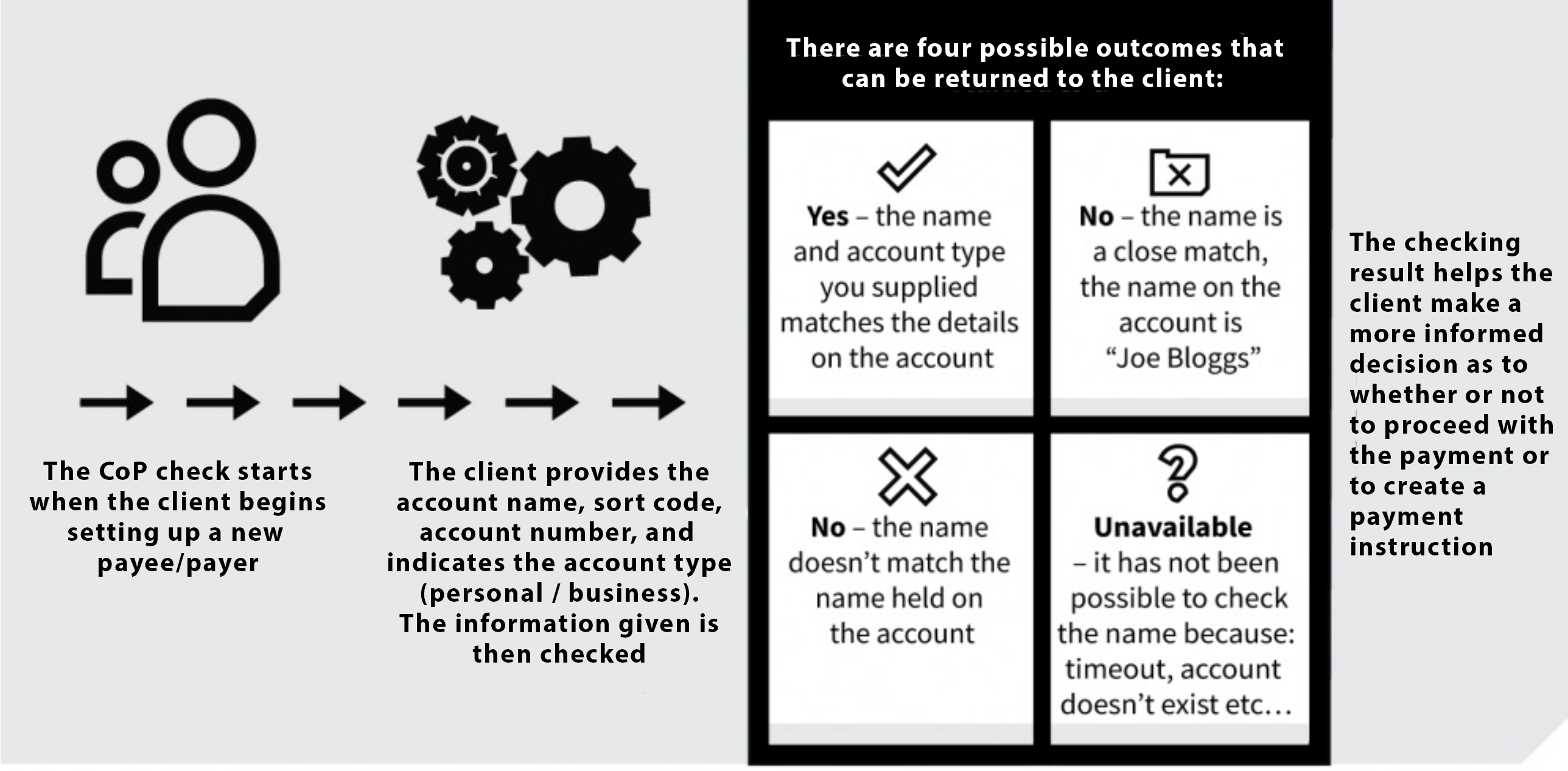
CoP verifies the account holder’s name by querying the customer’s bank or building society. The responding institution makes the decision and returns a match result.
Useful CoP Behaviours
For personal accounts, the exact registered name must be provided.
For joint accounts, either name on the account may be supplied (order does not matter).
For business accounts, the registered company name or trading name must be provided.
Customers may opt out of CoP with their bank — in these cases, no positive/negative match will be returned.
All matching logic is performed by the customer’s own bank, not PayPoint.
CoP Process Flow
The typical CoP flow involves:
Client submits account name + sort code + account number
PayPoint routes the request to the responding bank
Bank validates name and returns a match result
Client decides whether to proceed, ask the user to correct the name, or block the transaction
API Access & Documentation
The CoP API supports:
Singleton requests (real-time, synchronous)
Batch requests (asynchronous, polled results)
Full endpoint specifications are provided in the CoP API Documentation
FAQS
What are the difference between single and batch requests?
Singleton Requests
Fully synchronous
Typical response time: ~1 second (dependent on responding bank)
CoP scheme rules require a 3-second wait before retrying once
PayPoint timeout ≈ 7 seconds
Clients may set a shorter local timeout if desired
Batch Requests
Submitted as batch jobs
PayPoint serialises requests internally
Results are available once all individual checks complete
Client polls the batch results endpoint
Ideal for onboarding or nightly cleansing
What are the Rate limits?
Sandbox
The sandbox connects to the live CoP network, but is rate‑limited:
10 requests per 60 seconds
100 requests per day
Limits apply per x‑api‑key, shared across team members. Performance may be slower than production due to reduced scaling and cold‑start effects.
Production
10 TPS per client for single requests
No submission limit for batch uploads
Batch processing runs at 20 TPS
Maximum batch file size: 2.7 MB (≈ 10,000 accounts)
How can we do automated testing?
The sandbox returns live CoP results, which may include personal data. For automated testing, PayPoint provides a complete set of canned responses using the dummy sort code 00‑00‑00. These are listed below at: Test Bank Account & Response
These simulate all possible CoP match outcomes without touching real customer data.
How does name matching work?
Name matching is controlled entirely by the responding bank. While scheme rules define minimum expectations, banks may handle edge cases differently.
Banks cannot return “No Match” when:
First name and surname are reversed
Family name matches and the provided first name is a common variant (e.g., William/Bill, Elizabeth/Liz)
First name contains a single spelling error
Family name contains a single spelling error
Banks cannot return a “Full Match” unless:
Family name is an exact match
First character of the first name is correct
Banks may occasionally exceed these rules and return Full Match for slight deviations — behaviour varies by institution.
Test Bank Account Details & Responses
A set of dummy accounts is available under sort code 00‑00‑00, covering the full spectrum of CoP response codes. Using any valid live sort code will query real bank accounts and return genuine responses.
BankAccount - Accountype -- ResponseCode --- ShortDescription | StatusDescription
Any - Personal Or Business -- MATC --- Full Match | The account name provided is a match.
11111111 - Personal -- ANNM --- No Match Found | The account name provided is not the same as the name held on the Account.
11111112 - Personal -- MBAM --- Partial Match | The account name provided is not the same as the name held on the Account. It's a close match.
11111113 - Personal -- BANM --- Full Match - Business Account not Personal | The account name provided is a match but the account is a Business Account not a Personal one.
11111113 - Business -- MATC --- Full Match
11111114 - Business -- PANM --- Full Match - Personal Account not Business | The account name provided is a match but the account is a Personal Account not a Business one.
11111114 - Personal -- MATC --- Full Match
11111115 - Personal -- BAMM --- Partial Match - Business Account not Personal | This is a Business Account not a Personal one. The account name provided is not the same, it's a close match.
11111115 - Business -- MATC --- Full Match
11111116 - Business -- PAMM --- Partial Match - Personal Account not Business | This is a Personal Account not a Business one. The account name provided is not the same, it's a close match.
11111116 - Personal -- MATC --- Full Match
11111117 - Personal -- AC01 --- Account Number Not Found | The account details supplied do not exist. Please check details with recipient.
11111118 - Personal -- IVCR --- Reference Not Found | The secondary reference details supplied were not found. Please check details with recipient.
11111119 - Personal -- ACNS --- Account Does Not Support CoP Check | Unable to check the name as the type of account is not supported for CoP checks.
11111120 - Personal -- OPTO --- Match Unavailable - Customer Opted Out | Unable to check the name as the account holder has opted out of the CoP scheme.
11111121 - Personal -- CASS --- Match Unavailable - Account Switched using CASS | The Account has been switched, please contact the recipient for updated Account details.
11111122 - Personal -- SCNS --- Sort Code Not Found Unable to check the name. | The request has been routed to a responder who does not own the sort code. This would only normally happen due to an issue with the CoP directory, not anything in the request message. This is also the message we return if we cannot find the sort code in the directory to route the request to the right responder.
11111123 - Personal -- SECMISS --- Secondary Reference Missing | The account details provided require a Secondary Reference value before name can be checked. Please check with recipient. ( Note: An empty string or no Secondary Reference needs to be provided, to get a 'Secondary Reference Missing' response.)
11111123 - Personal -- MATC --- Full Match | Note: Any value needs to be provided as the secondary reference to get a Full Match
11111124 - Personal -- FOURHUN --- 400 Error Occurred | Unable to check the name, try again later.
11111125 - Personal -- HTTPERR --- HTTP Error occurred Unable to check the name, try again later.
Not for Testing - Personal -- TOOMANY --- Too Many Requests | Too Many Requests to Partner Banks - Please try again later
11111127 - Personal -- NOROUTE --- Unable to find a Participant Bank | Unable to find a Participant Bank to handle this request